
In this tutorial, we will show you how to create observable using create, of, from operators in Angular. We can use them to create new observable from the array, string, object, collection or any static data. Also learn the difference between the Of & From operators. If you are new to observable, we recommend you to read the Angular observable before continuing here.
There are many ways to create observable in Angular. You can make use of Observable Constructor as shown in the observable tutorial. There are a number of functions that are available which you can use to create new observables. These operators help us to create observable from an array, string, promise, any iterable, etc. Here are some of the operators
All the creation related operators are part of the RxJs core library. You can import it from the ‘rxjs’ library
The Create method is one of the easiest. The create method calls the observable constructor behind the scene. Create is a method of the observable object, Hence you do not have to import it.
ngOnInit() {

   //Observable from Create Method
   const obsUsingCreate = Observable.create( observer => {
     observer.next( '1' )
     observer.next( '2' )
     observer.next( '3' )

     observer.complete()
   })

    obsUsingCreate
      .subscribe(val => console.log(val),
              error=> console.log("error"),
              () => console.log("complete"))
}


****Output *****
1
2
3
Complete
We looked at this in the previous tutorial. There is no difference between the Observable.create method and observable constructor. The Create method calls the constructor behind the scene.
ngOnInit() {
   //Observable Using Constructor
   const obsUsingConstructor = new Observable( observer => {
      observer.next( '1' )
      observer.next( '2' )
      observer.next( '3' )

      observer.complete()
   })

   obsUsingConstructor
        .subscribe(val => console.log(val),
                error=> console.log("error"),
                () => console.log("complete"))
}


****Output *****
1
2
3
complete
The Of creates the observable from the arguments that you pass into it. You can pass any number of arguments to the Of. Each argument emitted separately and one after the other. It sends the Complete signal in the end.
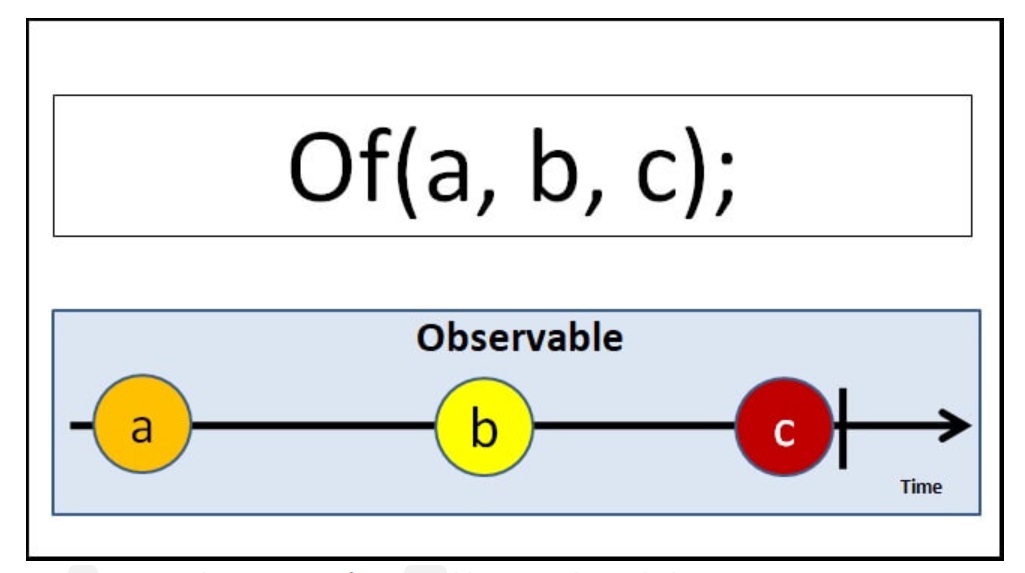
To use of you need to import it from rxjs library as shown below.
import { of } from 'rxjs';
Example of sending an array. Note that the entire array is emitted at once.
ngOnInit() {
  const array=[1,2,3,4,5,6,7]
  const obsof1=of(array);
  obsof1.subscribe(val => console.log(val),
           error=> console.log("error"),
          () => console.log("complete"))

}


**** Output ***
[1, 2, 3, 4, 5, 6, 7]
complete
You can pass more than one array
ngOnInit() {
  const array1=[1,2,3,4,5,6,7]
  const array2=['a','b','c','d','e','f','g']
  const obsof2=of(array1,array2 );
  obsof2.subscribe(val => console.log(val),
           error=> console.log("error"),
          () => console.log("complete"))

}


**** Output ***
[1, 2, 3, 4, 5, 6, 7]
['a','b','c','d','e','f','g']
complete
In the following example, we pass 1,2 & 3 as the argument to the from. Each emitted separately.
ngOnInit() {
    const obsof3 = of(1, 2, 3);
    obsof3.subscribe(val => console.log(val),
      error => console.log("error"),
      () => console.log("complete"))

}


**** Output ***
1
2
3
complete
We pass two strings to the of method. Each argument is emitted as it is.
 ngOnInit() {
    const obsof4 = of('Hello', 'World');
    obsof4.subscribe(val => console.log(val),
      error => console.log("error"),
      () => console.log("complete"))
}


**** Output ***
Hello
World
complete
We can pass anything to the Of operator. It justs emits it back one after the other.
 ngOnInit() {
    const obsof5 = of(100, [1, 2, 3, 4, 5, 6, 7],"Hello World");
    obsof5.subscribe(val => console.log(val),
      error => console.log("error"),
      () => console.log("complete"))
}

**** Output ***
100
[1, 2, 3, 4, 5, 6, 7]
Hello World
complete
From Operator takes only one argument that can be iterated and converts it into an observable.
You can use it to convert
It converts almost anything that can be iterated to an Observable.
To use from you need to import it from rxjs library as shown below.
import { from } from 'rxjs';
The following example converts an array into an observable. Note that each element of the array is iterated and emitted separately.
ngOnInit() {

    const array3 = [1, 2, 3, 4, 5, 6, 7]
    const obsfrom1 = from(array3);
    obsfrom1.subscribe(val => console.log(val),
      error => console.log("error"),
      () => console.log("complete"))

}

*** Output ****
1
2
3
4
5
6
7
complete
The from operator iterates over each character of the string and then emits it. The example is as shown below.
ngOnInit() {
  const obsfrom2 = from('Hello World');
    obsfrom2.subscribe(val => console.log(val),
      error => console.log("error"),
      () => console.log("complete"))
}


*** Output ****
H
e
l
l
o

W
o
r
l
d
complete
Anything that can be iterated can be converted to observable. Here is an example using a collection.
ngOnInit() {
      let myMap = new Map()
      myMap.set(0, 'Hello')
      myMap.set(1, 'World')
      const obsFrom3 = from(myMap);
      obsFrom3.subscribe(val => console.log(val),
        error => console.log("error"),
        () => console.log("complete"))
)

*** output ***
[0, "Hello"]
[1, "World"]
complete
Any Iterable types like Generator functions can be converted into an observable using from the operator.
ngOnInit() {
     const obsFrom4 = from(this.generateNos())
      obsFrom4.subscribe(val => console.log(val),
      error => console.log("error"),
      () => console.log("complete"))
}

*generateNos() {
   var i = 0;
   while (i < 5) {
     i = i + 1;
     yield i;
  }


*** Output ***
1
2
3
4
5
Use it to convert a Promise to an observable
ngOnInit() {
    const promiseSource = from(new Promise(resolve => resolve('Hello World!')));
    const obsFrom5 = from(promiseSource);
    obsFrom5.subscribe(val => console.log(val),
      error => console.log("error"),
      () => console.log("complete"))
}

*** Output ****
Hello World
complete
| Of | from |
|---|---|
| Accepts variable no of arguments | Accepts only one argument |
| emits each argument as it is without changing anything | iterates over the argument and emits each value |
We can use the Create method or Observable Constructor to create a new observable. The Of operators is useful when you have array-like values, which you can pass it as a separate argument to Of method to create an observable. The From Operate tries to iterate anything that passed into it and creates an observable out of it. There are many other operators or methods available in the RxJS library to create and manipulate the Angular Observable. We will learn a few of them in the next few tutorials
